
Training Room Layout: Classroom, U-Shape, Clusters or Theatre?
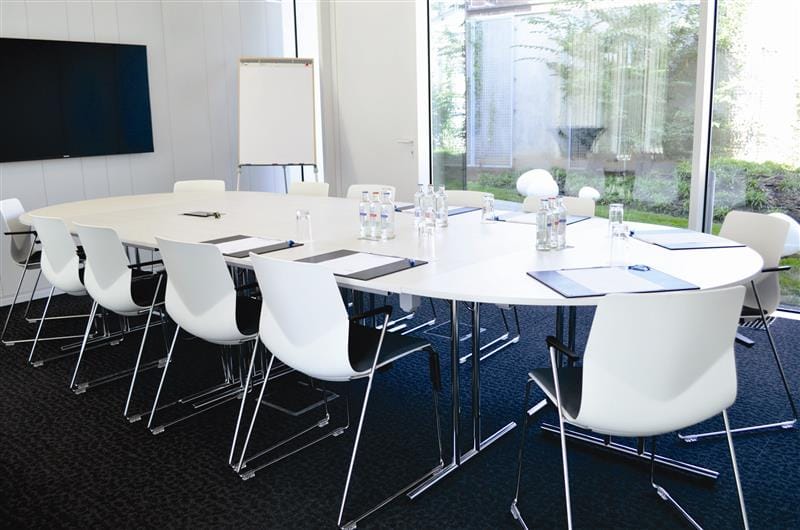
Choosing classroom, U-shape, cluster or theatre seating is not just a question of capacity. It shapes visibility of the trainer, note-taking comfort, participation and the effectiveness of exercises. The right layout must therefore begin with learning objectives and then account for furniture, technology and accessibility. This guide helps identify the best arrangement for the content and pace of your training.
The right layout depends on what participants need to do
Successful training is not simply a sequence of slides. Participants may need to listen, take notes, test a tool, debate or solve a problem as a team. The room layout should support these activities rather than restrict them. Before booking, review the length of each session, tools used, planned interaction and accessibility requirements.
A meta-analysis of 225 studies published in PNAS found an average improvement of approximately 6% in examination performance with active learning in higher-education STEM courses compared with traditional lectures. These findings do not directly measure corporate training or furniture layouts, but they reinforce the importance of an environment that supports participatory teaching. Read the study.
1. Classroom layout: comfortable individual work facing the trainer
Rows of tables facing the trainer give everyone a surface for a laptop, notebook or printed material. The classroom layout is suitable for technical training, software demonstrations, certification courses and sessions where note-taking occupies a substantial part of the programme.
- Strengths: shared visibility of the screen, individual work surfaces and easy distribution of materials.
- Watch-outs: interaction between rows is less natural, trainer movement may be restricted and capacity is lower than in theatre layout.
- Plan for: safely routed power supplies, sightlines from the back, tables of sufficient depth and unobstructed aisles.
If the session alternates individual exercises and paired discussions, arrange places so neighbours can collaborate without moving all the furniture. For extended group work, consider clusters instead.
2. U-shape layout: encourage questions and dialogue
Tables form three sides around a central space, with an opening towards the screen or trainer. Participants can see one another and speak without constantly turning around. A U-shape works particularly well for management workshops, sales training, group coaching and learning based on shared experience.
- Strengths: eye contact between participants, dynamic facilitation and direct access for the trainer to the central area.
- Watch-outs: considerable central floor space, lower capacity and greater separation between the ends of a very large U.
- Plan for: microphones where necessary, visibility of the projection, circulation behind chairs and access to materials.
The group size must allow genuinely fluid discussion. When too many participants sit around a U-shape, exchanges become less spontaneous. Dividing the group or using clusters for exercises is often preferable.
3. Cluster layout: produce, experiment and collaborate
Clusters bring small groups together around separate tables. They suit case studies, simulations, brainstorming, role-playing and collaborative problem-solving. Each team has space to share materials and equipment and produce a tangible outcome.
Groups of four to six people are often a practical starting point, but this is an organizational suggestion, not a regulatory capacity limit. The appropriate size depends on the exercise, furniture and facilitation available.
- Strengths: active participation, exchange of ideas and shared resources.
- Watch-outs: simultaneous noise, participants with their backs to the screen and more complex monitoring of each group’s progress.
- Plan for: written instructions, exercise timings, group debriefs and easy circulation between tables.
If the programme frequently alternates presentations and teamwork, consider cabaret or crescent-shaped arrangements where available. This variation keeps participants in groups while improving sightlines towards the trainer.
4. Theatre layout: brief a larger audience
Rows of chairs facing a stage or screen can accommodate more participants without individual work surfaces. This layout suits shared introductions, educational talks, awareness sessions and shorter lecture-style presentations.
- Strengths: efficient use of space, attention directed towards the speaker and straightforward setup.
- Watch-outs: uncomfortable note-taking or laptop use, reduced interaction and difficulties with extended exercises.
- Plan for: screens readable from the back rows, sound reinforcement, microphones for questions and suitable breaks.
A theatre layout can open a training day before workshops take place in other spaces. However, when learners need to use laptops for several hours, it is generally not the right main configuration.
5. Balance capacity, accessibility and equipment
A venue’s advertised capacity is not interchangeable between classroom, U-shape, clusters and theatre layouts. Tables, circulation space, technical positions, projection and accessible seating change the usable capacity. Have a floor plan approved for your actual programme rather than relying on a theoretical maximum.
Always check step-free access, evacuation routes, acoustics, sightlines, Wi-Fi and equipment power supplies. For a group using several laptops simultaneously, power needs and cable routing must be anticipated with the technical team.
Explore BluePoint Liège’s training rooms and discuss possible layouts before finalising participant numbers.
6. Adapt the room to the training programme
Divide training into segments: presentation, demonstration, individual exercise, group work and debrief. Identify the longest segment and the one with the strongest constraints. If the session mainly involves laptop exercises, start with classroom seating. If outcomes are produced in groups, favour clusters. Choose a U-shape for discussion workshops and theatre seating for an introductory plenary.
Do not improvise a complete reconfiguration in the middle of a tightly scheduled programme. If two very different layouts are essential, allow time, staff and a precise plan, or split activities between complementary rooms. Also read our general guide to room layouts.
Choose a setup that genuinely supports learning
An effective layout is not the one that fits the most chairs into a room, but the one that supports the planned work without compromising comfort or safety. Classroom seating gives everyone a workstation; the U-shape encourages dialogue; clusters structure collaboration; theatre seating focuses attention on presentations. These four options serve different purposes and should not be chosen by habit.
Before confirming a booking, share your teaching agenda, required equipment, group sizes and proportion of practical exercises with the venue. A floor plan based on these requirements will prevent costly compromises on the day and give the trainer the conditions needed to achieve the learning objectives. Contact BluePoint Liège to discuss the right layout for your next professional training session.